Create more engaging videos with simple, actionable scriptwriting tips.
Join 5000+ scriptwriting nerds reading “Write On Time”. Insights from writing for multi-million subscriber YouTubers sent to your inbox every Friday.
.jpg)
Chess Nuke
@chessnuke
30k+ Subcribers

Create more engaging videos with simple, actionable scriptwriting tips.
Join 2,200+ scriptwriting nerds reading “Write On Time”. Insights from writing for multi-million subscriber YouTubers sent to your inbox every Friday.
Jay Clouse asked me a question I've been dodging...
Recently, Jay Clouse invited me onto the Creator Science Podcast...
We covered exactly how I use AI to write YouTube scripts, including:
- How I go from blank page to V1 script with AI, plus one part of the scriptwriting process where I've deliberately stopped using it.
- Jay's end-screen tactic that I'm seriously considering stealing, even though it breaks my non-negotiable rule for ending a video.
- My honest take on how I really feel about AI, as someone building an AI scriptwriting app.
Speak soon,
George 👋
So... where have I been?
It’s been a little quiet here recently, so I wanted to say hello and explain where I’ve been.
Since March, I’ve been building PlayWriteAI, my AI scriptwriting app.
(700+ people are on the waitlist btw - you can join them here.)
My community started testing it in May, and by July it was pretty much ready to launch…
...but then cheeky old Google got involved, didn't they?
In a nutshell, because the app connects to your YouTube channel, Google has to approve me to use their data.
But their review process has been a [redacted] nightmare.
I've spent more than two months locked in an endless back-and-forth with their compliance team, desperately trying to get some clarity.
(If anyone knows someone on Google’s compliance team btw, I would gladly accept their email as an early Christmas present.)
So, for now, I can't launch it.
The problem is, when my brain gets stuck on a big project, others (like this newsletter) tend to suffer.
So thanks for sticking with me. I'm looking forward to getting back to it more regularly soon.
In the meantime, I'm reopening applications for the YouTube Writer’s Room in a couple of weeks, so if you'd like to see a little more of me (every day, in fact!), you can join the community waitlist here.
Speak soon,
George 👋
Stop adding context to your AI projects
Despite the insane (and slightly worrying) weekly advances of AI, the most common complaint I still hear is:
“ChatGPT doesn’t sound like me.”
If that's you, you've probably tried the most obvious thing:
Just add more context.
Style guides. Audience avatars. Old newsletters. Swipe files. Transcripts. Examples. More. More. More.
I remember being at dinner with a friend who showed me one of his AI projects in Claude.
He must have had 20+ documents inside it.
And one of my community students does something similar - collecting advice from the best YouTube strategists he can find…
…and putting all of it into one project.
It seems logical.
More knowledge = better responses, right?
Not necessarily, for a simple reason:
Eventually, your context starts fighting itself.
For staters, even your own style guide can contain contradictions:
- “Be concise… but use plenty of examples.”
- “Sound casual… but speak with authority.”
- “Don’t waste time with preamble… but set everything up clearly.”
Now imagine adding a newsletter swipe file from two YouTube strategists to your context pile.
One writes their hooks using "Target, transformation, stakes".
The other uses "Proof, promise, plan".
Who's right? Whose formula should ChatGPT or Claude use to write your hook?
And this is just the start of your troubles.
Imagine how these contradictions will build up once you start adding 15, 20, 30 documents to your projects.
The problem is, the AI doesn’t have a little judge inside it to decide which rule is correct.
- Sometimes it favours one.
- Sometimes it compromises.
- Sometimes the answer changes depending on your prompt.
And it only gets worse.
Because AI models become less reliable at finding and using the right information as the amount of context grows.
Large AI projects may pull in information they think is relevant, rather than actually reading every document in full.
That means the absolute gold dust you heard in a podcast and added to your scriptwriting project yesterday... might never get read by the AI.
Think of it like this:
Continually adding more context documents to an AI project is like adding endless ingredients to a recipe.
Each ingredient might be tasty. And some will work really well together.
But pretty soon, you'll end up with a big bowl of brown slop.
So... what's the solution?
Well, Anthropic (who makes Claude) explained this very helpfully:
Use the “smallest possible set of high-signal tokens.”
In other words:
- Keep your context minimal.
- Keep it relevant.
- And every so often, clean it up.
So, if you've got a project in ChatGPT or Claude that's getting a bit out of hand, start a new chat and paste this:
“Review the context and instructions available in this project. Find duplicates, contradictions, outdated advice and low-value information. Recommend what to KEEP, MERGE, SHORTEN or DELETE. Then propose a smaller source of truth that preserves the useful information without the overlap.”
More context can help.
But only when it’s the right context.
That's all for this week.
As always, if you have any questions, feel free to reply.
Speak soon,
George 👋
What Netflix taught me about YouTube scriptwriting
My partner doesn't really care about football (soccer).
She didn't grow up watching it, doesn't play it, and doesn't follow it today.
Yet we've both been glued to Netflix's recent documentary, Mourinho, which follows the career of one of the world's greatest football managers.
Sure, I probably gain a little extra something from it because I did grow up watching players from this era.
But my partner is still completely drawn in by... well, by what?
Well, the truth is: this documentary is not really about football.
If it were, she wouldn't be interested.
Actually, it's about tension. Drama. Story.
Now, I know many of you reading this are educators, not entertainers.
And I understand that having (sorry José) an absolute maniac as your protagonist certainly keeps people watching.
But as YouTubers, we can lean into the exact same principles:
- Hooks set up the drama. They show the viewer why they should care. They make the video's consequences feel personal. - article
- Segments build tension. They remind the viewer what's at stake throughout. They explore smaller stories within the overarching narrative that help reveal the final payoff. - article
- End-screen CTAs preview what happens next... if the viewer watches just one more video. - article
If storytelling can make somebody with almost zero interest in football watch a 3-hour football documentary...
...then we should have no problem convincing an already interested audience to watch our videos for 15 minutes, right?
(Ok, fine, it's maybe not that easy.)
But you get the point.
Storytelling is art, yes. But it's also maths.
Watch enough of these football documentaries, and you start to notice the same structures appear over and over again.
Storytelling on YouTube is no different.
Yes, you should add your own personal flair... but don't overcomplicate it.
Focus on core scriptwriting frameworks for YouTube.
Double down on the principles that keep your audience watching; abandon those that don't.
That's all for this week.
As always, if you have any questions, feel free to reply.
Speak soon,
George 👋
This writing trick works in literally any niche
This week, we took one of my most commonly used scriptwriting frameworks...
... and applied it to a 6m subscriber kids channel.
To be honest, this is not a niche I've worked in before.
But the results were very interesting.
And they reassured me that this scriptwriting framework is a no-brainer for pretty much any channel (including yours).
So... what's the framework?
Well, the most important part of any YouTube script is structure.
But deciding how to progress from A to B to C is the easy part.
It's how you signpost that structure that matters most.
Regardless of whether you're making an educational or entertainment video, the viewer needs to understand your video's structure in two key places:
- Hook - right at the outset, set the expectation of the video's structure.
- Setups - when a new segment begins, remind the viewer where in the structure they are so they don't lose track.
Now, I've spoken about this before.
But I'd never applied it to kids' entertainment.
Part of me wondered whether an 8-year-old would have the patience to sit through an extra 5-10 seconds of structural explanation.
But once we saw the retention (it stayed above the average for over half the video), not only does it seem like they do...
...but it turns out they were actively more engaged because they understood the video's structure better from the word "go".
Now I don't want to oversell it... this was just one video. We'll keep testing.
But it's an early signal that the exact same framework I've spent 5 years screaming about might truly be niche-agnostic.
i.e. it doesn't matter what niche, sub-niche, format or age-range you're making videos for...
...human brains need structure.
And spending an extra 5 seconds signposting that structure at the start...
...might buy you an extra 50 seconds of their attention later.
That's all for this week.
Speak soon,
George 👋

YouTubers - this damages audience trust
Losing your audience's trust rarely happens overnight.
So today, I want to show you the scriptwriting mistake you were told would grow your channel faster...
...but which gradually burns the trust you built up with your viewers.
And it comes down to this:
We all know negativity sells.
Negative headlines. Scary tweets. Comment section ragebait.
As human beings, we're drawn to negative things more than positive things.
It's called loss aversion - we're more scared to lose something than we are excited to gain something...
...so we instinctively pay more attention to the things that could impact us negatively to help us avoid them.
And this is exactly why most YouTube videos are framed through a negative lens.
- "Follow these tips, or your portfolio will drop by $10,000."
- "Start this diet, or you're 2x more likely to have a heart attack."
- "Read my newsletter, or your YouTube videos will bomb!" 😉
(Yes, of course, I do this too!)
There's nothing wrong with negative framing.
Until it becomes disingenuous. Or "fake".
"Get this wrong, and your plant will be dead in a week - and you'll have wasted $30 that could have been spent on your kid's clothes!"
The truth is: most YouTubers don't do this deliberately.
But they're so used to framing the stakes of their video through a negative lens that they start to prioritise this fear-based approach over all else.
So on your next video, when you're figuring out how to write the hook, or working on a segment setup...
...start by thinking of the negative frame you could use.
And if it feels authentic... stick with it. Because we know it's effective.
But if it doesn't... consider what the positive frame might look like.
❌ Negative: "Your messy inbox is quietly destroying your productivity." Maybe true! But it's a massive, overused claim that probably can't deliver on the magnitude of its promise.
✅ Positive: "Clearing your inbox early frees up your mind to tackle the most important tasks without distraction." A more measured, attainable promise.
❌ Negative: "Get this wrong and your dog bolts into traffic, leaving you with a vet bill you can't cover." A real fear, but way too heavy for a video teaching dog training.
✅ Positive: "Spend just five minutes in the garden practicing this, and your daily walk goes from a stressful to-do to a genuine joy for both of you." Framed around the ease of the practice and the positive outcome.
Because telling your viewers to PANIC in every single video starts to wear thin.
Eventually, you sound like the boy who cried wolf.
And if you're not being authentic, your viewers will start to lose trust.
Genuine negative frame > Genuine positive frame > Inauthentic negative frame
That's all for this week.
Speak soon,
George 👋
.png)
Fix this before using AI for YouTube scripts
If you use AI to help you write YouTube scripts, but you aren't choosing the right AI model...
...the results will be terrible.
Here's why:
While building PlayWriteAI, I've been experimenting with a tonne of different AI models to create the best possible outputs.
And, as you may know, they're all good at different things.
If we just look at Anthropic (Claude)'s most common models:
- Opus - great at dealing with large amounts of information without forgetting or "hallucinating". Not great at creative writing.
- Sonnet - can't handle large amounts of information, but great at creative writing.
- Haiku - by today's frontier model standards... basically useless. But very cheap comparatively. I use it to "mark" the work of other models.
(And, of course, Fable is the new frontier model, but honestly, for writing, I would avoid it.)
OpenAI (ChatGPT)'s models also have their comparative strengths.
But most people don't even think about which model they're using.
They just assume the default model is probably good enough for whatever they need.
Not only is this not true (per my examples above), but these companies regularly default you to the less powerful models to save themselves cash.
So don't just use whatever model your AI defaults to. Pick the right model for the job.
- Using AI to create structure or analyse large amounts of research? Use Claude Opus or ChatGPT o-series.
- Using AI for creative writing? Use Claude Sonnet (or ChatGPT 5, but it's a bit meh by comparison).
The biggest hack? Simply ask the AI which model would be best for completing the task you've set it.
That's all for this week.
As always, if you have any questions, feel free to reply.
Speak soon,
George 👋

No one really admits this about YouTube...
It's been almost two months since I last wrote this newsletter - I hope you're doing well!
The truth is, whenever I have a big project in the works, I prefer to put these on ice.
I thought I might be out of action for 2-3 weeks...
...but working on my scriptwriting app, PlayWriteAI, turned into an absolute monster of a project.
So while I'm not yet ready to return to business as usual here (i.e. newsletter every Friday), I want to share an important reflection I've had during this hiatus:
You can take a break from making content. It's fine 😆
It's beautiful watching YouTube work for you in the background.
Not only did I stop writing my newsletter two months ago, but I also stopped uploading to YouTube.
Yet over the last month, my channel has continued to pull in a continuous stream of viewers...
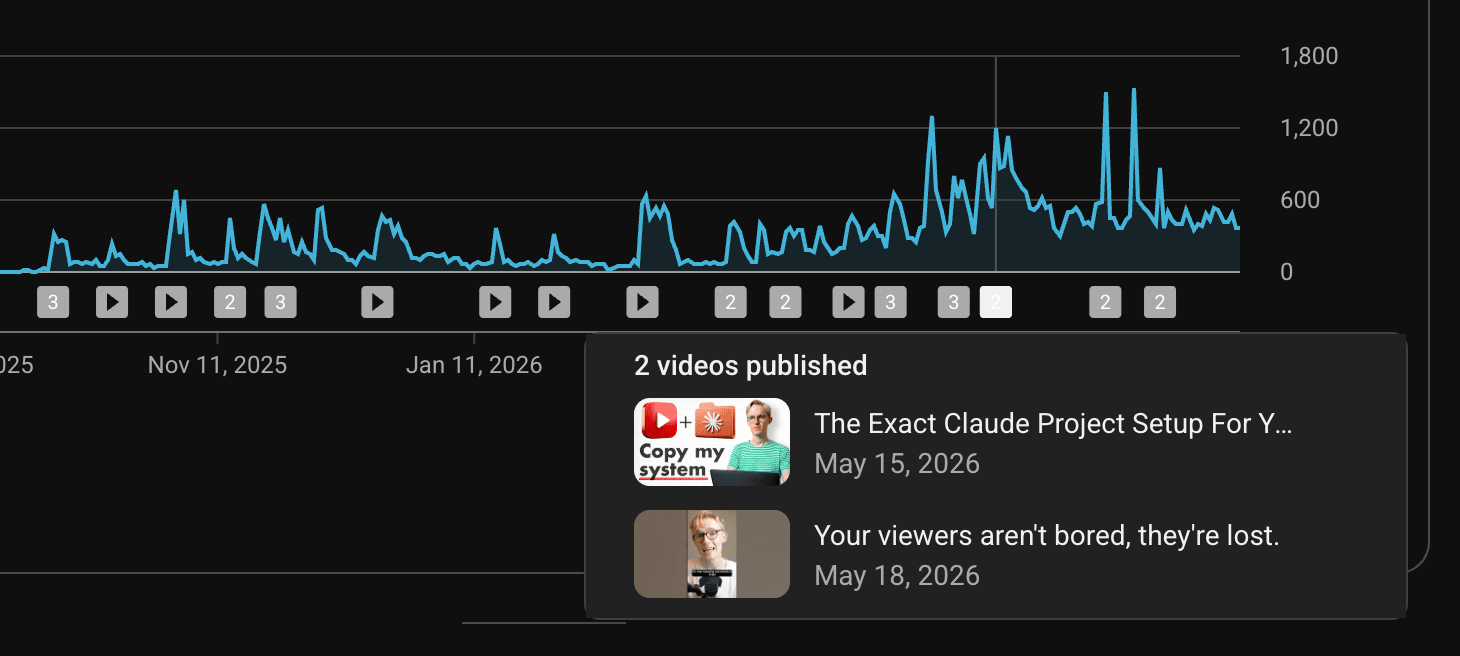
Two months since my last long-form upload, and views have remained almost 100% consistent.
Of course, the goal is consistency... but you don't have unlimited energy.
It's so easy to get sucked into a content hamster wheel, but it's important to remember that taking a break - especially one in service of a bigger goal - doesn't kill your channel overnight.
In fact, some of my favourite YouTubers deliberately work in seasons.
I'll see weekly uploads from them for two months, then nothing for the following two while they recharge.
Sometimes they semi-disappear for a year (usually if they're writing a book).
But I'm just as happy (if not happier) when they come back.
Energy management is a very real thing, and YouTube is hard work.
So, especially if you're working solo or with a tiny team (🙋🏼♂️), give yourself permission to switch your focus when the situation demands it.
Good content keeps growing on YouTube for years. (And it feels bloody amazing.)
Ready to meet your new AI scriptwriting buddy?

I want to make PlayWriteAI the world's best AI scriptwriting app.
I opened up 20 beta testing spots in June, which sold out in 3 minutes (!)
Very soon, it'll be ready for launch. You can join the waitlist if you're interested.
That's all for this week.
I've learned so much about AI + scriptwriting over the last 3 months.
I'll be sharing more of those insights soon.
As always, if you have any questions, feel free to reply.
Speak soon,
George 👋
.png)
Which YouTube Studio metrics should I care about?
I filmed a Q&A last week so I could respond to as many of your recent scriptwriting questions as possible.
So while I'm "taking it easy" on my newsletter for the next few weeks to help me focus on my scriptwriting app...
...I've decided to share my response to three of those questions per week over the next few Fridays.
(Full Q&A releasing on my channel soon!)
How should I adjust my scripts based on my YouTube Studio analytics? I assume AVD is the main metric?
My response:
- I pay almost 0 attention to average view duration (AVD) or even average percentage viewed (APV) because these are so affected by the type/length of video.
- For example, longer videos tend to have higher AVD (yay!) but shorter APV (oh no!)
- But shorter videos tend to have lower AVD (oh no!) but higher APV (yay!).
- In both cases, one metric seems like a "win", but the other seems like a "loss". So looking at those metrics feels like you can't win.
- Retention graphs are, therefore, the main piece of data to pay attention to from a scriptwriting perspective. Pick 3 videos and review the spikes, dips and flat segments from each. I guarantee you'll notice several matching patterns (good and bad), and therefore something to improve in your next script.
- The caveat (and where AVD is useful) is when comparing videos of similar length. But, again, to actually diagnose why the video with the worst AVD was worse... you'd have to look at the retention graph.
My videos involve an element of "discovery", so how can I write my payoffs before I film when I don't know what's going to happen?
My response:
- This is very common on entertainment channels, and even educational channels like "review" channels that test products "live".
- In these cases, focus on writing just the hook and segment setups. These are the parts that rely on your actual curiosity as the YouTuber, and which help you plan the structure before you film.
- For example, in a video reviewing a pair of bluetooth headphones, one of my setups might be something like: "Next I wanted to test the [headphone name]'s noise cancelling. But honestly... I was going in with pretty low expectations after their demo at CES."
- Writing just the hook and setups before filming frees you up to act naturally during filming, while still establishing a clear structure to guide you.
- Then, edit brutally after filming to remove rambling, and write additional voiceover to tie things together.
Is scriptwriting dying?
My response:
- This question intrigued me, but despite the rapid advancement of AI, I don't think it is at all.
- I still get asked for writer recommendations as frequently as ever... that truly hasn't changed in the last 5 years.
- But something has changed. When I started doing this in 2021, I grew my personal brand quickly because there weren't many people doing YouTube-specific writing-for-hire. I also stood out because I had worked for Ali Abdaal.
- But today, the market has been absolutely flooded with YouTube scriptwriters (and Ali Abdaal has hired half the known universe). Therefore, the supply has increased more rapidly than the demand, which makes it harder to stand out.
- My advice - learn to use AI "responsibly". Ergo, don't entirely outsource your scriptwriting to AI and expect clients to love it. Work with the AI to write faster. Then share what you're learning publicly (YouTube, X, personal newsletter) so when new clients come around, they don't have to read 10-page scripts you wrote to assess your quality...
- ...they can simply scroll your socials and see that you think deeply and carefully about this stuff.
That's all for this week.
Speak soon,
George 👋
Create more engaging videos with simple, actionable scriptwriting tips.
Join 6,000+ scriptwriting nerds reading “Write On Time”. Insights from writing for multi-million subscriber YouTubers sent to your inbox every Friday.